
How it works
Whether you're scrolling on your phone or shopping on your desktop, effortlessly save items from any store into one seamless, shareable wishlist.
Mobile app
Chrome extension
Say goodbye to screenshots and open tabs!
With the Sortd mobile app, easily save items from any online store into your wishlists. Access your lists anytime to compare, decide, and buy - all from your phone.
Save while you browse
1. Tap the ‘Share’ icon

2. Select Sortd

3. Choose a wishlist
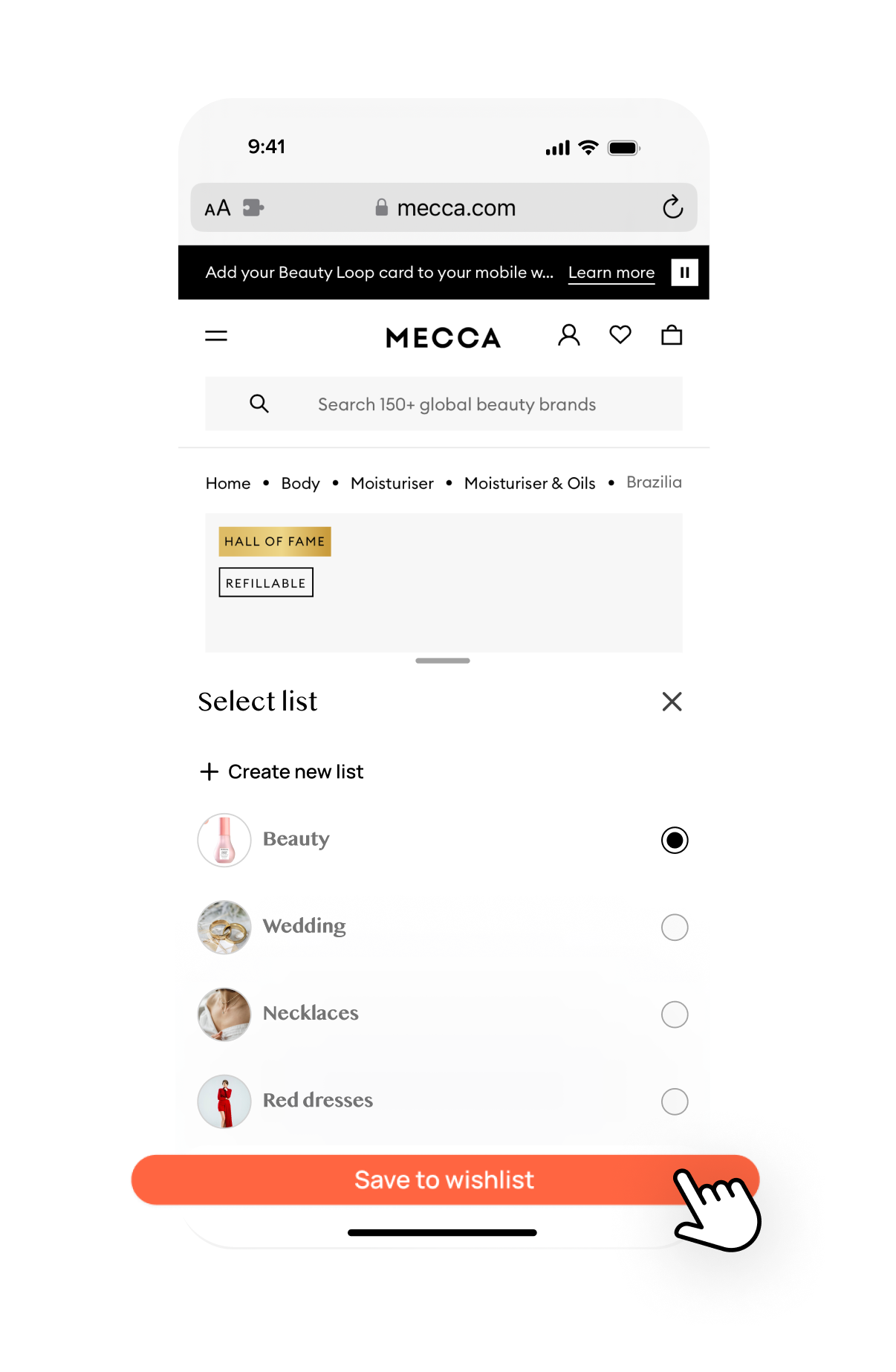
4. That’s it… you’re Sortd!

Can’t find the Sortd icon?
Here’s how to add Sortd to your browser favourites.
1. Tap the ‘Share’ icon

2. Swipe left through your apps and tap ‘more’.
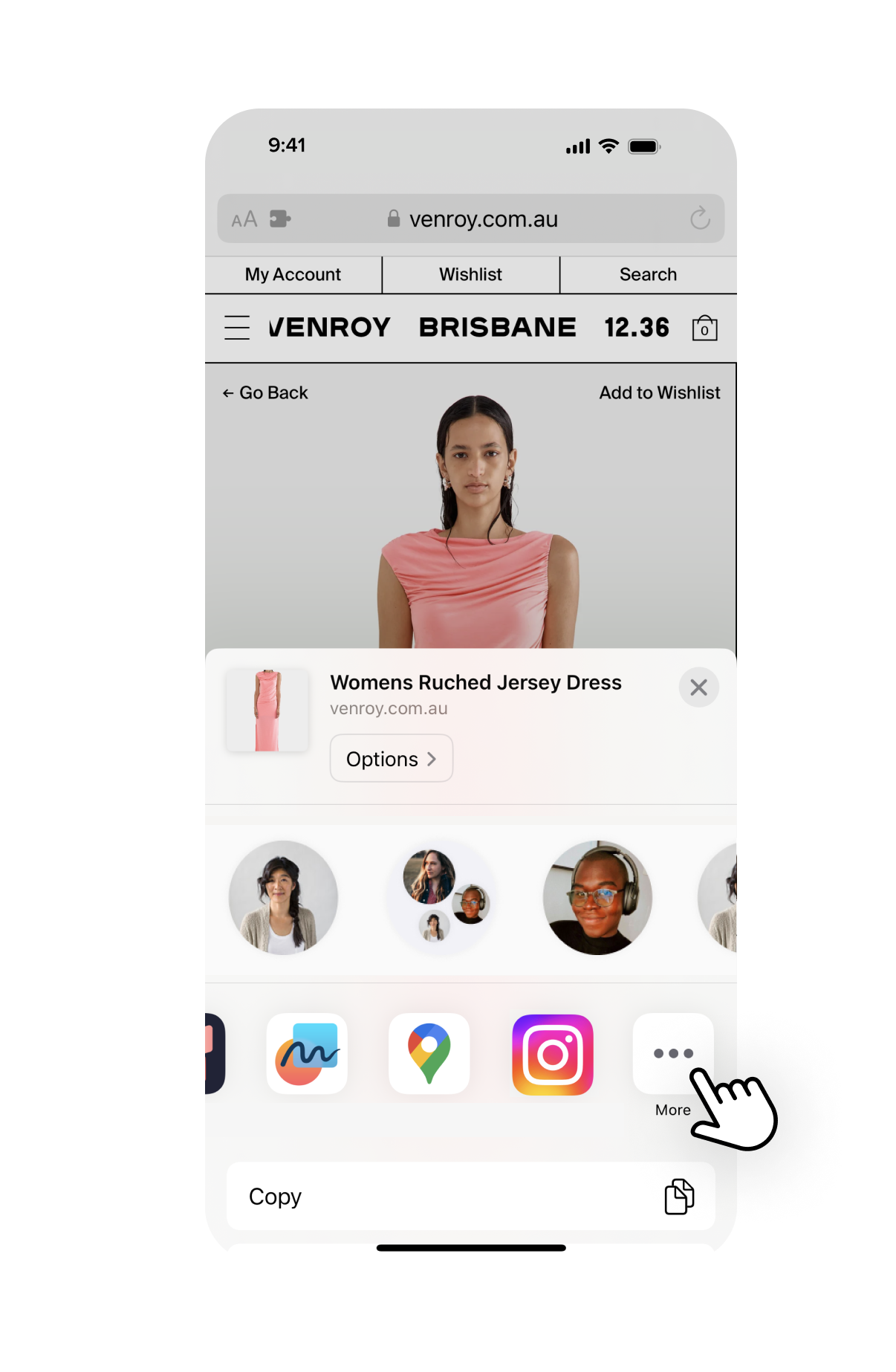
3. Select ‘edit’ and add Sortd to your favourites.

Say goodbye to screenshots and open tabs!
The Sortd Chrome Extension lets you save and organise items from any online store directly into your wishlists as you browse. Easily come back to compare, decide, and buy from your desktop.
STEP 1: Search a store and find an item you want to save. Once you open the item, tap the ‘Sortd’ icon on the right side of your screen to activate the extension.
STEP 2: Create a list or save the item to an existing one - and add notes for your reference later.
STEP 3: Click save to wishlist and visit the web-app to view all your items in one place.

TIP: Right-click on any product page and scroll down to select “Save to Sortd” for a quick shortcut to save items.
No screenshots allowed.

Instead, create wishlists to keep track of everything you want to buy, with the Sortd App.

FAQs
-
Sortd lets you browse and save items from any online store via the in-app shopping browser. You can also save items directly to your wishlist from other apps like Safari, TikTok, or Instagram so that you can save while you browse.
Save items to your Sortd wishlist, categorise them, and revisit to compare your options. When you’re ready, checkout directly through Sortd. -
Yes, Sortd is completely free.
-
Absolutely! Share any list by tapping the ‘aeroplane’ icon in the top right-hand corner of each of your wishlists. Sharing your list invites your friends or family to view or purchase the items that you have saved.
-
Make sure your push notifications are enabled for Sortd so that you're the first to know when an item in your wishlist is on sale.
-
There are a few ways to save items to your Sortd wishlist.
1 - Save from your mobile browser by using the 'share' icon and selecting the Sortd app.
2 - Tap the 'Search' icon at the bottom of the app to search and browse any online store. Once you find an item you love, click the 'Save to wishlist' button and select a wishlist to save it to.
3 - If you find an item you love from the Discover feed, you can click on the item and then click 'Save to wishlist' and select a wishlist to save it to.
-
Yes, you can save items from apps like Instagram, Safari, or TikTok. Just tap the share icon, select Sortd, and add the item to your wishlist.
-
Simply tap the image or the ‘buy’ button to be directed to the store to complete your purchase. You can checkout via the Sortd app, or via your external browser.
-
You can remove an item from your wishlist by using the ... on the top right of every list or by opening an item and selecting ‘Delete’.
-
There is no limit to the number of items you can add to your wishlist.
-
Yes, organise wishlists by category - like clothing, home decor, or Christmas Gifts—to keep everything organised and accessible. You can make as many wishlists as you like!
-
Currently, Sortd is only supported on iOS iPhone and Mac desktops.
-
Yes! Sortd supports items from any online store worldwide.
-
Occasionally, price, description, or image information might display incorrectly. Contact us, and we’ll fix it for you.
-
You can view another person’s wishlist if they’ve shared it with you or if they have posted their list to the Discover feed.
-
Other people can only see your lists if you have shared it with them or if you have posted them on the Discover page.
-
Create a new wishlist and give it a name! If you leave it as public, your wishlist will be added to the Discover Feed. If you mark it as private, only you can see it.
-
Yes! Your wishlist will only be discoverable when you have 4+ products.
-
Yes, by selecting ‘Bookmark’ icon on the top of any wishlist. This will save in a folder under the ‘Bookmarked’ section on the wishlist tab.
-
By using the search box at the top of the Discover page. You can search by username, wishlist name or product.
-
Tap the "Bookmark" icon on curated lists to save them in your "Bookmarked" section.